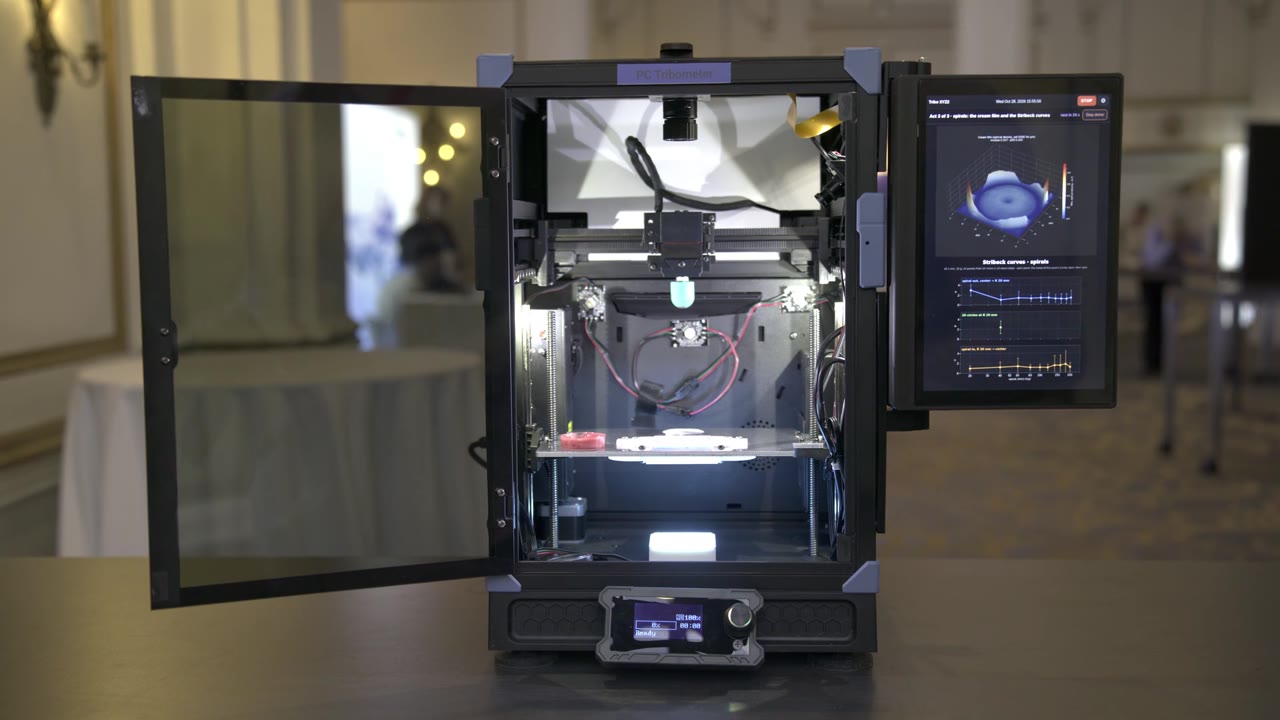
What does a cream feel like when it spreads? Start with the action itself: a probe, a surface, and a controlled motion.
The Spreading Tribometer, running with its chamber open.
02 — The gesture
A finger-like motion. Made repeatable.
The moving head guides a ball probe through controlled circles. The product responds beneath it.
A macro view of the probe spreading cream.
03 — The measurement
Motion becomes evidence.
The operator works the side-mounted display to control the instrument. During a run, normal and friction forces become measurements you can inspect.
A finger works the instrument’s side-mounted touchscreen.
04 — The vision system
One experiment. Three perspectives.
A chamber-overview camera supports remote monitoring and launch. A side camera watches the probe. An overhead camera images the sample surface.
The three-camera system in the actual instrument.
For photometric stereo, the overhead camera takes seven photos under seven known light sources to reconstruct high-resolution surface and height maps.
05 — Advanced Texture Analyzer
Chewing is more than compression.
A model jaw brings vertical and lateral motion together. The lower teeth slide sideways beneath the upper teeth.
Phone footage of a bench unit chewing cheese.
06 — Interchangeable end effectors
Change the contact. Change the test.
The Advanced Texture Analyzer can change from a model jaw to a finger probe by hand. The demonstration set includes several other end effectors.
The jaw comes off. The finger probe goes on.
Actual hardware / 03
Tongue
A tongue-shaped contact surface on a broad mounting base, shown as part of the demonstration adapter set.
Mount
Upper probe, beneath the moving head
Shown in
Demonstration adapter set
Hardware photographs and illustrative geometry show the demonstration adapter set and its mounting points.
All items are part of the same demonstration end-effector set. Material and contact variants are not separate rental options. Labels describe shapes, not final product SKUs; probe geometry and test methods are configured for the application.
07 — The configuration
Your test. Your benchtop.
Start with the measurement, not a fixed product specification. Hardware, probes, test methods, and software can be scoped as one system for your lab.
01
Form factor
Benchtop formats, larger chambers, and temperature-controlled enclosures scoped around the sample.
02
Sensing & vision
Force measurement, additional camera positions, and application-specific imaging.
03
Motions & methods
Spreading, friction, compression, lateral chewing, dipping, stickiness, and custom test protocols.
04
Software & integration
Instrument software, networked data access, remote monitoring, and API integration for your lab’s workflow.
Actual imaging results on the instrument display. Software and integrations are scoped separately.
These are configuration directions to engineer and quote, not a claim that every option is available off the shelf.
08 — Your point of view
Go ahead. Look around.
The model is yours now. Drag to rotate, pinch or scroll to zoom, or select a numbered part.
The complete Advanced Texture Analyzer, with interchangeable probes.
The Advanced Texture Analyzer at work.
Illustrative models reconstructed from demonstration footage. Not to scale; not CAD. Motion is illustrative, not an engineering simulation. The network connector and integration path are configuration concepts, not a description of the filmed prototype’s ports or protocols.
Rental and purchase
Start with an end effector. Build the experiment.
Begin with one instrument and one end effector. Add different ways to test as your questions change. Prices below are in USD per day.
Local rental
$300 / day
One benchtop instrument and one end effector.
Data stays on the instrument and is available on the attached display.
Additional end effectors
$150 / day each
Each additional supported end effector.
Custom end effectors on request, with support for every end effector and swaps as your methods change.
Connected system
$500 / day
Remote data access and integration with your network or cloud environment.
$300 base + $200 connection, including up to six end effectors. Integration is scoped with your IT team.
A rental example
Finger + tongue
$450 / day
$300 base + $150 for the second end effector.
End effectors
One included. Add others for $150/day each.
Local data on the attached display. Supported end effectors can be swapped as your methods change.
Rental availability, shipping, support, and end-effector-swap logistics are confirmed in your quote. Network and cloud integrations are scoped with your IT team.
How to start
Bring the test. We’ll build around it.
A conversation about the measurement comes first. From there we can scope the instrument, methods, software, and integration as one system.
01
Your product and question
Tell us what you make and what you want to understand about how it feels.
02
The instrument and method
Define the gesture, end effector, sensing, and chamber format your test needs.
03
The data and connection
Tell us how your lab wants to use the results: exports, remote access, or an API. Bring your IT requirements if integration matters.